
XMS INFORMATION TECHNOLOGY SERVICES
  • 0 Shopping Cart
  •   Portal Home
  •   Store
    • Browse All
    • Shared Hosting
    • OpenVZ VPS hosting
    • Linux KVM VPS
    • Windows VPS
    • ERPNext Plan
    • Managed VPS
    • SMO
    • SEO Packages
    • Website Design
    • E-commerce
    • Site Builder
    • Printing & Laser engraving Service
    • E-mail Services
    • SSL Certificates
    • Website Security
    • Professional Email
    • Website Builder
    • SEO Tools
    • Website Backup
    • Site Builder
    • VPN
    • Site & Server Monitoring
    • XOVI NOW
    • Register a New Domain
    • Transfer Domains to Us
  •   Announcements
  •   Knowledgebase
  •   Network Status
  •   Affiliates
  •   Contact Us
  • More
  •   Account
    • Login
    • Register
    • Forgot Password?
  1. Portal Home
  2. Knowledgebase
  3. cPanel
  4. cPanel Basics
  5. Setting up a Redirect for a Domain in your cPanel

  Categories

cPanel
30
VPS
4

  Categories

  Support

My Support Tickets
Announcements
Knowledgebase
Downloads
Network Status
Open Ticket

Setting up a Redirect for a Domain in your cPanel Print

  • 0

Step 1. Login to cPanel.

Step 2. Under the domains section select the Redirects icon.
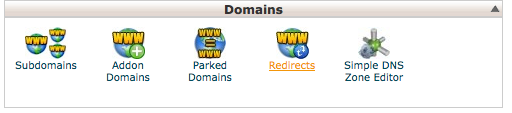
Redirects

Step 3. On the next screen, fill in the boxes as needed and click the add button.
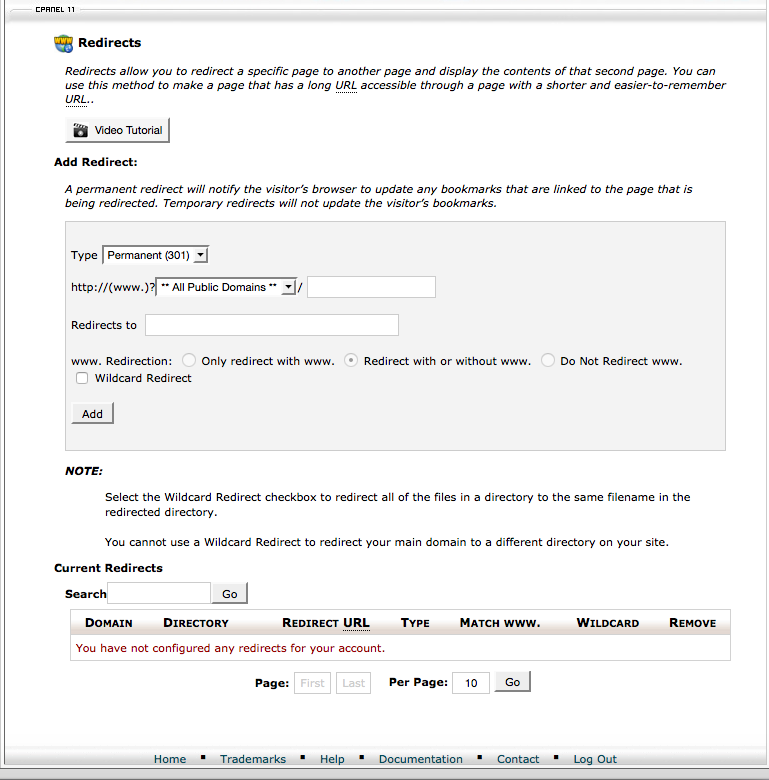
Redirects


Was this answer helpful?

Related Articles

Backing Up your Website Backing up your website is a necessary step for all users.Before making any changes to your... How to create a custom Under Construction/Coming Soon page 1. Login into cPanel.2. Enter the File Manager. Be sure to navigate to the root folder for the... How to log into Webmail Step 1. Visit yourdomain.com/webmail   or https://webmail.yourdomain.comNote! Be sure to replace... How to login into cPanel This article will review the two different ways you can login to cPanel -  via WHM and via a... Modify an Add-on domain's document root in cPanel Step 1. Under the Domains section click on Addon Domains.Step 2. Double-click on the pencil icon...
« Back

  Support

My Support Tickets
Announcements
Knowledgebase
Downloads
Network Status
Open Ticket
  • Contact Us

Copyright © 2025 XMS INFORMATION TECHNOLOGY SERVICES. All Rights Reserved.


Loading...
Loading...
Choose language
العربية
Azerbaijani
Català
中文
Hrvatski
Čeština
Dansk
Nederlands
English
Estonian
Persian
Français
Deutsch
עברית
Magyar
Italiano
Macedonian
Norwegian
Português
Português
Română
Русский
Español
Svenska
Türkçe
Українська

Choose Currency

$ USD
P PHP

Generate Password

Please enter a number between 8 and 64 for the password length